# Draugiem.lv Passport API documentation
## 1. Draugiem.lv Passport
### 1.1. Introduction
Draugiem.lv Passport allows external websites to introduce functions that use the profile information of draugiem.lv users. That allows projects that are not created by draugiem.lv to access friendship links between their users and improve their functionality based on this information.
Draugiem.lv Passport can be used in various ways. It can fully replace website registration and login system to remove the need for every user to perform difficult registration. If the website already has a registration system, it can use draugiem.lv Passport to link user's profile in the website with the profile in draugiem.lv.
When the user accesses a page with draugiem.lv Passport, he agrees to give his personal data to thrd party developers.
After approval process, application receives user's API key that gives it a limited access to user's data and ability to post messages to user activity feed or profile news (if the application has permission to use these functions).
If the user wants to discontinue use of the application, he can delete if from his profile. After deletion, application no more has access to the user's data.
### 1.2. Opening draugiem.lv Passport login window
To allow the user to login to a website by draugiem.lv Passport, you have to place in the site a button or a link that opens the login window. When the user clicks on this button, a webpage or new window is opened:
1. it allows the user to enter his username and password, if the user is currently not logged into draugiem.lv,
2. it displays user's name, picture and an *Allow* button - if user is logged into draugiem.lv
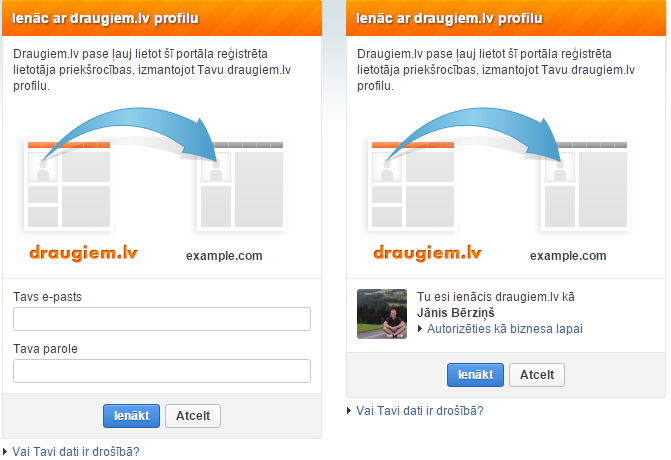
Authorization page URL is created in this format: `https://api.draugiem.lv/authorize/?app=[app_id]&hash=[control_hash]&redirect=[redirect_url]`
- `app`: application ID that was created when the app was created
- `redirect`: URL where to redirect the user after the login
- `hash`: 32 symbol hash, MD5 function result from the application API key and the redirect URL (e.g. if the API key is `7c437d28be62b492151788f6c827afd6` and redirect URL IS `https://example.com/draugiem_auth/`, then the hash is created by calling `md5('7c437d28be62b492151788f6c827afd6https://example.com/draugiem_auth/')` ).
### 1.3. Acquiring authorization code
After the login, user will be redirected to the URL that was given in the `redirect` parameter, with GET variable `dr_auth_status` added.
If the value of `dr_auth_status` is `failed`, user has denied the application to access his data. If its value is `ok`, then the authorization has been successful and another GET parameter `dr_auth_code` is added - it is authorization code that the application can use to obtain user's API key that is required for further use of the API.
When the application has received `dr_auth_code` value, it an finalize the authentication process and acquire user's API key, by performing API request `authorize` (described in the section User authentication).
**Some suggestions for developers**
- After authorization, user profile data should be kept within the session instead of requesting them repeatedly in every request.
- If user data are displayed in many places in the page, they should be cached on application's side to prevent unnecessary load both on draugiem.lv and application's servers.
- If your application uses PHP, it is best to use our provided [PHP library](https://draugiem.eu/applications/dev/php_en/) for the integration of draugiem.lv Passport.
- Passport login window has to be opened so that the address bar is visible and the user can confirm that he is entering is pasword in a web page that belongs to draugiem.lv.
- After user login, the page has to display user name that has entered the page and provide an option to log out.
- For login buttons, it is recommended to use one of our [draugiem.lv Passport logos](https://draugiem.eu/development/passport_logos.zip)
- If you need to contact us, please write email to [api@draugiem.lv](mailto:api@draugiem.lv),
- Ensure that nobody can access your application's API key.
- To increase security, you can add IP limit to your servers in the application settings. Never perform API requests from the client side (Javascript or Flash) - that wil make your API key exposed to everyone.
## 2. How to use draugiem.lv API
### 2.1. API requests
To acquire data or perform other actions with draugiem.lv API, application server has to perform HTTP POST or GET requests to draugiem.lv server, providing necessary request parameters according to API specification. Parameters can be passed as HTTP GET, POST or COOKIE variables (however, POST is recommended).
API request URL depends on chosen data format. Draugiem.lv API provides following formats:
| Format | Description | API address |
| --- | --- | --- |
| **XML** | API response will be encoded in in XML format | |
| **PHP** | API response will be encoded in PHP serialized data format | |
| **JSON** | API response will be encoded in JSON format | |
| **PLIST** | API response will be encoded in Apple Property List XML format | |
Examples provided by this documentation will show API responses in XML format. Our provided *PHP library * uses PHP serialized format.
API request always must contain parameter `action` that contains required API action, and parameter `app` that contains the API key of the application (API key is created when you create the application and it is used to identify the application that performs API requests).
Almost always API request will contain parameter `apikey`, that identifies draugiem.lv user that has authorized the application.
**Example:** To obtain basic profile info in XML format (application API key - `52967e99b3c11a755e7635901c23c0cf`, user API key - `208d970441dd5f3e87b965fedabd0738`), you have to perform this request:
`https://api.draugiem.lv/xml/?app=52967e99b3c11a755e7635901c23c0cf&apikey=208d970441dd5f3e87b965fedabd0738&action=userdata`
According to this request, server will respond with data structure in chosen format:
```xml
Jānis
Bērziņš
1
![]() https://i1.ifrype.com/profile/491/171/v3/sm_491171.jpg
M
```
### 2.2. Error codes
If application has performed invalid API request or any other error has occured, API response will contain error code and description.
**XML example:**
```xml
Access denied
```
**PHP serialized format example:**
```
a:1:{s:5:"error";a:2:{s:11:"description";s:13:"Access denied";s:4:"code";i:150;}}
```
**JSON example:**
```json
{"error":{"description":"Access denied","code":150}}
```
**Possible error codes:**
| Code | Error description | Explanation |
| --- | --- | --- |
| 10 | Internal error | API internal error |
| 20 | Service not available | API is temporarily unavailable |
| 80 | Bad request | Error in request parameters |
| 90 | Invalid action | Invalid value of `action` parameter |
| 101 | Invalid user API key | Invalid value of `apikey` parameter (user API key) |
| 103 | Invalid application API key | Invalid value of `app` parameter (application API key) |
| 104 | IP address not allowed | API request was performed from address that is not within allowed addreses in application settings |
| 105 | Max API request limit in 10 minutes reached | Application has reached max request limit in 10 minutes per user. |
| 106 | Invalid or unapproved auth code | `code` parameter that was used in `authorize` request was invalid or already used. |
| 107 | Max activity limit for this user today reached | Max activity or notification count for this user per day has been reached |
| 120 | Data not found | Requested data not found |
| 130 | Spam/Flood detected | Too frequent sending of data (activities/notifications) |
| 150 | Access denied | Application does not have access to the requested data. |
### 2.3. User data
If API request requests information related with user data, API answer will contain block `users` with basic profile information of users. Every user element contains attribute `uid` that uniquely identifies draugiem.lv user and can be used to create relations between user and other objects.
**XML example:**
```xml
...
Jānis
Bērziņš
1
https://i1.ifrype.com/profile/491/171/v3/sm_491171.jpg
M
```
### 2.2. Error codes
If application has performed invalid API request or any other error has occured, API response will contain error code and description.
**XML example:**
```xml
Access denied
```
**PHP serialized format example:**
```
a:1:{s:5:"error";a:2:{s:11:"description";s:13:"Access denied";s:4:"code";i:150;}}
```
**JSON example:**
```json
{"error":{"description":"Access denied","code":150}}
```
**Possible error codes:**
| Code | Error description | Explanation |
| --- | --- | --- |
| 10 | Internal error | API internal error |
| 20 | Service not available | API is temporarily unavailable |
| 80 | Bad request | Error in request parameters |
| 90 | Invalid action | Invalid value of `action` parameter |
| 101 | Invalid user API key | Invalid value of `apikey` parameter (user API key) |
| 103 | Invalid application API key | Invalid value of `app` parameter (application API key) |
| 104 | IP address not allowed | API request was performed from address that is not within allowed addreses in application settings |
| 105 | Max API request limit in 10 minutes reached | Application has reached max request limit in 10 minutes per user. |
| 106 | Invalid or unapproved auth code | `code` parameter that was used in `authorize` request was invalid or already used. |
| 107 | Max activity limit for this user today reached | Max activity or notification count for this user per day has been reached |
| 120 | Data not found | Requested data not found |
| 130 | Spam/Flood detected | Too frequent sending of data (activities/notifications) |
| 150 | Access denied | Application does not have access to the requested data. |
### 2.3. User data
If API request requests information related with user data, API answer will contain block `users` with basic profile information of users. Every user element contains attribute `uid` that uniquely identifies draugiem.lv user and can be used to create relations between user and other objects.
**XML example:**
```xml
...
Jānis
Bērziņš
1
![]() https://i1.ifrype.com/profile/491/171/v3/sm_491171.jpg
M
...
```
**PHP example:**
```
a:1:{s:5:"users";a:1:{i:3342174;a:7:{s:3:"uid";i:3342174;s:4:"name";s:6:"Jānis";s:7:"surname";s:9:"Liepiņš";s:3:"age";b:0;s:5:"adult";i:0;s:3:"img";b:0;s:3:"sex";s:1:"F";}}}
```
**JSON example:**
```json
{"users":{"3342174":{"uid":3342174,"name":"J\u0101nis","surname":"Liepi\u0146\u0161","age":false,"adult":0,"img":"https://i1.ifrype.com/profile/491/171/v3/sm_491171.jpg","sex":"M"}}}
```
Every user data item contins these values:
- `name`: First name
- `surname`: Last name
- `age`: age (empty, if user wants to hide his age)
- `adult`: indicates if user has reached age 18 (1 - adult, 0 - not adult). Allows to check if user is adult even if he wants to hide his age.
- `img`: Profile image URL (100x100px). Empty if user has no image.
- `sex`: gender (M - male, F - female)
To get user profile image in different sizes, simply replace in URL part `sm_` with another prefix:
- `i_`: 50x50px icon
- `sm_`: 100x100px icon
- `m_`: 215px wide image
- `l_`: large image (max. 710x710px)
**Example:** If profile image URL is `https://i1.ifrype.com/profile/491/171/v3/sm_491171.jpg`, then URL of middle sized version of this image will be `https://i1.ifrype.com/profile/491/171/v3/m_491171.jpg`.
### 2.4. Notifications about deleted users
If you fill field *Delete status callback URL* with your URL in application settings, draugiem.lv will notify you about users that have deleted themself from your application or deleted their profile entirely.
That allows you to remove user information from you database or perform other actions that are necessary to perform if user ceases to use the application.
Our server will call your URL with these parameters added:
- `status`: value `delete`
- `uid`: User ID of deleted user
- `app`: Application ID
**Example:**
Application with ID 1234 has configured address `https://example.com/delete_profile/` as delete callback URL. When user with ID 12345 deletes from application, draugiem.lv server will call URL `https://example.com/delete_profile/?status=delete&uid=12345&app=123`
Response to this request must contain only text `OK`, otherwise draugiem.lv system will try to resend status report.
## 3. Available API requests
### 3.1. User authentication process (request authorize)
Request allows application to acquire user's API key that is neccessary to perform other API requests on behalf of the user. The request also returns user's basic profile information so that no additional requests are needed to get this data.
**Request parameters:**
- `action`: `authorize`
- `app`: application API key (32 characters)
- `code`: `dr_auth_code` value that was received as GET variable after user login (for draugiem.lv Passport applications) or when the iframe was opened (for integrated applications)
**Response will contain these parameters:**
- `apikey`: user's API key
- `uid`: user ID
- `language`: 2 letter code of the language that the user has selected in draugiem.lv
- `inviter`: user ID of the person who has invited this user to the application (this element is present only when user opens application for the first time after accepting invitation)
- `invite_extra`: extra data that were attached to the accepted invitation by the application (this element is present only when user opens application for the first time after accepting invitation)
User's API key allows application to access user's data via API wthout repeating authorization. After authorization application will be added to the *My Applications* section of the user's profile. From there user will be able to discontinue application's permission to access his data.
Response also contains user's profile information according to the format described in section User data.
**Example response:**
```xml
09797abfe8e5ea53fd857cc372e3a6f5
491171
lv
Jānis
Bērziņš
21
1
https://i1.ifrype.com/profile/491/171/v3/sm_491171.jpg
M
...
```
**PHP example:**
```
a:1:{s:5:"users";a:1:{i:3342174;a:7:{s:3:"uid";i:3342174;s:4:"name";s:6:"Jānis";s:7:"surname";s:9:"Liepiņš";s:3:"age";b:0;s:5:"adult";i:0;s:3:"img";b:0;s:3:"sex";s:1:"F";}}}
```
**JSON example:**
```json
{"users":{"3342174":{"uid":3342174,"name":"J\u0101nis","surname":"Liepi\u0146\u0161","age":false,"adult":0,"img":"https://i1.ifrype.com/profile/491/171/v3/sm_491171.jpg","sex":"M"}}}
```
Every user data item contins these values:
- `name`: First name
- `surname`: Last name
- `age`: age (empty, if user wants to hide his age)
- `adult`: indicates if user has reached age 18 (1 - adult, 0 - not adult). Allows to check if user is adult even if he wants to hide his age.
- `img`: Profile image URL (100x100px). Empty if user has no image.
- `sex`: gender (M - male, F - female)
To get user profile image in different sizes, simply replace in URL part `sm_` with another prefix:
- `i_`: 50x50px icon
- `sm_`: 100x100px icon
- `m_`: 215px wide image
- `l_`: large image (max. 710x710px)
**Example:** If profile image URL is `https://i1.ifrype.com/profile/491/171/v3/sm_491171.jpg`, then URL of middle sized version of this image will be `https://i1.ifrype.com/profile/491/171/v3/m_491171.jpg`.
### 2.4. Notifications about deleted users
If you fill field *Delete status callback URL* with your URL in application settings, draugiem.lv will notify you about users that have deleted themself from your application or deleted their profile entirely.
That allows you to remove user information from you database or perform other actions that are necessary to perform if user ceases to use the application.
Our server will call your URL with these parameters added:
- `status`: value `delete`
- `uid`: User ID of deleted user
- `app`: Application ID
**Example:**
Application with ID 1234 has configured address `https://example.com/delete_profile/` as delete callback URL. When user with ID 12345 deletes from application, draugiem.lv server will call URL `https://example.com/delete_profile/?status=delete&uid=12345&app=123`
Response to this request must contain only text `OK`, otherwise draugiem.lv system will try to resend status report.
## 3. Available API requests
### 3.1. User authentication process (request authorize)
Request allows application to acquire user's API key that is neccessary to perform other API requests on behalf of the user. The request also returns user's basic profile information so that no additional requests are needed to get this data.
**Request parameters:**
- `action`: `authorize`
- `app`: application API key (32 characters)
- `code`: `dr_auth_code` value that was received as GET variable after user login (for draugiem.lv Passport applications) or when the iframe was opened (for integrated applications)
**Response will contain these parameters:**
- `apikey`: user's API key
- `uid`: user ID
- `language`: 2 letter code of the language that the user has selected in draugiem.lv
- `inviter`: user ID of the person who has invited this user to the application (this element is present only when user opens application for the first time after accepting invitation)
- `invite_extra`: extra data that were attached to the accepted invitation by the application (this element is present only when user opens application for the first time after accepting invitation)
User's API key allows application to access user's data via API wthout repeating authorization. After authorization application will be added to the *My Applications* section of the user's profile. From there user will be able to discontinue application's permission to access his data.
Response also contains user's profile information according to the format described in section User data.
**Example response:**
```xml
09797abfe8e5ea53fd857cc372e3a6f5
491171
lv
Jānis
Bērziņš
21
1
![]() https://i1.ifrype.com/profile/491/171/v3/sm_491171.jpg
https://i1.ifrype.com/profile/491/171/v3/i_491171.jpg
https://i1.ifrype.com/profile/491/171/v3/m_491171.jpg
https://i1.ifrype.com/profile/491/171/v3/l_491171.jpg
M
```
To be able to access user's data again, application has to store the `apikey` value and use it in all further API requests.
If application has lost user's API key or if the user has deleted if from the profile, authorization process can be repeated. User's API key can change if the user change his password or deletes application from the profile and joins repeatedly.
### 3.2. Getting user data of specific users (request userdata)
This request allows to get basic profile information of specific draugiem.lv users who have authorized the application. This request doesn't require user's API key, just the application's key.
**Request parameters:**
- `action`: `userdata`
- `app`: application API key (32 characters)
- `apikey`: user API key (32 characters), optional, if `ids` parameter is provided
- `ids`: optional, comma separated list of draugiem.lv user IDs (max 100 IDs per request)
If request contains parameter `ids`, response will contain profile information of requested users according to format described in section User data. Only information about users that are registered in application will be returned (if the user has deleted from the application, data will not be available anymore)
If `ids` parameter is not given, then API will return information about user who owns the API key passed in `apikey` parameter according to format described in section User data.
The order of returned user data is not strictly defined.
**Example response:**
```xml
Jānis
Bērziņš
21
1
https://i1.ifrype.com/profile/491/171/v3/sm_491171.jpg
https://i1.ifrype.com/profile/491/171/v3/i_491171.jpg
https://i1.ifrype.com/profile/491/171/v3/m_491171.jpg
https://i1.ifrype.com/profile/491/171/v3/l_491171.jpg
M
```
To be able to access user's data again, application has to store the `apikey` value and use it in all further API requests.
If application has lost user's API key or if the user has deleted if from the profile, authorization process can be repeated. User's API key can change if the user change his password or deletes application from the profile and joins repeatedly.
### 3.2. Getting user data of specific users (request userdata)
This request allows to get basic profile information of specific draugiem.lv users who have authorized the application. This request doesn't require user's API key, just the application's key.
**Request parameters:**
- `action`: `userdata`
- `app`: application API key (32 characters)
- `apikey`: user API key (32 characters), optional, if `ids` parameter is provided
- `ids`: optional, comma separated list of draugiem.lv user IDs (max 100 IDs per request)
If request contains parameter `ids`, response will contain profile information of requested users according to format described in section User data. Only information about users that are registered in application will be returned (if the user has deleted from the application, data will not be available anymore)
If `ids` parameter is not given, then API will return information about user who owns the API key passed in `apikey` parameter according to format described in section User data.
The order of returned user data is not strictly defined.
**Example response:**
```xml
Jānis
Bērziņš
21
1
![]() https://i1.ifrype.com/profile/491/171/v3/sm_491171.jpg
https://i1.ifrype.com/profile/491/171/v3/i_491171.jpg
https://i1.ifrype.com/profile/491/171/v3/m_491171.jpg
https://i1.ifrype.com/profile/491/171/v3/l_491171.jpg
User_Default
M
Elīna
Ozoliņa
25
1
https://i1.ifrype.com/profile/491/171/v3/sm_491171.jpg
https://i1.ifrype.com/profile/491/171/v3/i_491171.jpg
https://i1.ifrype.com/profile/491/171/v3/m_491171.jpg
https://i1.ifrype.com/profile/491/171/v3/l_491171.jpg
User_Default
M
Elīna
Ozoliņa
25
1
![]() https://i8.ifrype.com/profile/064/428/v3/sm_64428.jpg
https://i1.ifrype.com/profile/491/171/v3/i_64428.jpg
https://i1.ifrype.com/profile/491/171/v3/m_64428.jpg
https://i1.ifrype.com/profile/491/171/v3/l_64428.jpg
User_Business
F
```
In case of using Draugiem.lv passport, the user data may also contain official draugiem.lv pages ( www.draugiem.lv/lapas ) data instead of the regular user data. To determine if this is a regular user or page, you need to check the value in the `type` parameter. Currently 2 values are possible:
- User_Default - ordinary user
- User_Business - business page
### 3.3. Getting list of application users (request app_users)
Request allows to get a list of all users that use the application. This request doesn't require user's API key, just the application's key.
**Request parameters:**
- `action`: `app_users`
- `app`: application API key (32 characters)
- `show`: optional, if this parameter is given with value `ids`, only list of user IDs will be returned instead of full profile data.
- `page`: optional, number of the page that needs to be returned. By default, first page will be returned.
- `limit`: optional, number of users per page (allowed range 1-200). By default one page contains 20 users.
If request does not contain parameter `show` with value `ids`, response will contain element `users`, filled with information according to format described in section User data. Element `users` will have an attribute `total` that contains total number of users.
**Example response (show=ids is not given):**
```xml
Jānis
Bērziņš
21
1
https://i8.ifrype.com/profile/064/428/v3/sm_64428.jpg
https://i1.ifrype.com/profile/491/171/v3/i_64428.jpg
https://i1.ifrype.com/profile/491/171/v3/m_64428.jpg
https://i1.ifrype.com/profile/491/171/v3/l_64428.jpg
User_Business
F
```
In case of using Draugiem.lv passport, the user data may also contain official draugiem.lv pages ( www.draugiem.lv/lapas ) data instead of the regular user data. To determine if this is a regular user or page, you need to check the value in the `type` parameter. Currently 2 values are possible:
- User_Default - ordinary user
- User_Business - business page
### 3.3. Getting list of application users (request app_users)
Request allows to get a list of all users that use the application. This request doesn't require user's API key, just the application's key.
**Request parameters:**
- `action`: `app_users`
- `app`: application API key (32 characters)
- `show`: optional, if this parameter is given with value `ids`, only list of user IDs will be returned instead of full profile data.
- `page`: optional, number of the page that needs to be returned. By default, first page will be returned.
- `limit`: optional, number of users per page (allowed range 1-200). By default one page contains 20 users.
If request does not contain parameter `show` with value `ids`, response will contain element `users`, filled with information according to format described in section User data. Element `users` will have an attribute `total` that contains total number of users.
**Example response (show=ids is not given):**
```xml
Jānis
Bērziņš
21
1
![]() https://i1.ifrype.com/profile/491/171/v3/sm_491171.jpg
https://i1.ifrype.com/profile/491/171/v3/i_491171.jpg
https://i1.ifrype.com/profile/491/171/v3/m_491171.jpg
https://i1.ifrype.com/profile/491/171/v3/l_491171.jpg
M
Elīna
Ozoliņa
25
1
https://i1.ifrype.com/profile/491/171/v3/sm_491171.jpg
https://i1.ifrype.com/profile/491/171/v3/i_491171.jpg
https://i1.ifrype.com/profile/491/171/v3/m_491171.jpg
https://i1.ifrype.com/profile/491/171/v3/l_491171.jpg
M
Elīna
Ozoliņa
25
1
![]() https://i8.ifrype.com/profile/064/428/v3/sm_64428.jpg
https://i1.ifrype.com/profile/491/171/v3/i_64428.jpg
https://i1.ifrype.com/profile/491/171/v3/m_64428.jpg
https://i1.ifrype.com/profile/491/171/v3/l_64428.jpg
F
```
If request contains parameter `show` with value `ids`, response will contain element `userids`, that will hold a list of draugiem.lv user IDs. Element `users` will have an attribute `total` that contains total number of users.
**Example response (show=ids is given):**
```xml
64428
491171
1524905
134564
234561
```
### 3.4. Getting number of application users (request app_users_count)
Request allows to get count of currently registered users in the application.
**Request parameters:**
- `action`: `app_users_count`
- `app`: application API key (32 characters)
Response contains element `usercount`, that contains the number of users that have authorized the application.
**Example response:**
```xml
312
```
### 3.5. Getting list of user's friends that use the application (request app_friends)
Request allows to get information about user's friends that use the application.
**Request parameters:**
- `action`: `app_friends`
- `app`: application API key (32 characters)
- `apikey`: user API key (32 characters)
- `show`: optional, if this parameter is given with value `ids`, only list of user IDs will be returned instead of full profile data.
- `page`: optional, number of the page that needs to be returned. By default, first page will be returned.
- `limit`: optional, number of users per page (allowed range 1-200). By default one page contains 20 users.
If request does not contain parameter `show` with value `ids`, response will contain element `users`, filled with information according to format described in section User data. Element `users` will have an attribute `total` that contains total number of friends.
**Example response (show=ids is not given):**
```xml
Jānis
Bērziņš
21
1
https://i8.ifrype.com/profile/064/428/v3/sm_64428.jpg
https://i1.ifrype.com/profile/491/171/v3/i_64428.jpg
https://i1.ifrype.com/profile/491/171/v3/m_64428.jpg
https://i1.ifrype.com/profile/491/171/v3/l_64428.jpg
F
```
If request contains parameter `show` with value `ids`, response will contain element `userids`, that will hold a list of draugiem.lv user IDs. Element `users` will have an attribute `total` that contains total number of users.
**Example response (show=ids is given):**
```xml
64428
491171
1524905
134564
234561
```
### 3.4. Getting number of application users (request app_users_count)
Request allows to get count of currently registered users in the application.
**Request parameters:**
- `action`: `app_users_count`
- `app`: application API key (32 characters)
Response contains element `usercount`, that contains the number of users that have authorized the application.
**Example response:**
```xml
312
```
### 3.5. Getting list of user's friends that use the application (request app_friends)
Request allows to get information about user's friends that use the application.
**Request parameters:**
- `action`: `app_friends`
- `app`: application API key (32 characters)
- `apikey`: user API key (32 characters)
- `show`: optional, if this parameter is given with value `ids`, only list of user IDs will be returned instead of full profile data.
- `page`: optional, number of the page that needs to be returned. By default, first page will be returned.
- `limit`: optional, number of users per page (allowed range 1-200). By default one page contains 20 users.
If request does not contain parameter `show` with value `ids`, response will contain element `users`, filled with information according to format described in section User data. Element `users` will have an attribute `total` that contains total number of friends.
**Example response (show=ids is not given):**
```xml
Jānis
Bērziņš
21
1
![]() https://i1.ifrype.com/profile/491/171/v3/sm_491171.jpg
https://i1.ifrype.com/profile/491/171/v3/i_491171.jpg
https://i1.ifrype.com/profile/491/171/v3/m_491171.jpg
https://i1.ifrype.com/profile/491/171/v3/l_491171.jpg
M
Elīna
Ozoliņa
25
0
https://i1.ifrype.com/profile/491/171/v3/sm_491171.jpg
https://i1.ifrype.com/profile/491/171/v3/i_491171.jpg
https://i1.ifrype.com/profile/491/171/v3/m_491171.jpg
https://i1.ifrype.com/profile/491/171/v3/l_491171.jpg
M
Elīna
Ozoliņa
25
0
![]() https://i8.ifrype.com/profile/064/428/v3/sm_64428.jpg
https://i1.ifrype.com/profile/491/171/v3/i_64428.jpg
https://i1.ifrype.com/profile/491/171/v3/m_64428.jpg
https://i1.ifrype.com/profile/491/171/v3/l_64428.jpg
F
```
If request contains parameter `show` with value `ids`, response will contain element `userids`, that will hold a list of draugiem.lv user IDs. Element `users` will have an attribute `total` that contains total number of friends.
**Example response (show=ids is given):**
```xml
64428
491171
1524905
134564
234561
```
### 3.6. Getting number of user's friends that use the application (request app_friends_count)
Request allows to get the number of active user's friends that also use the application.
**Request parameters:**
- `action`: `app_friends_count`
- `app`: application API key (32 characters)
- `apikey`: user API key (32 characters)
Response contains element `friendcount`, that contains the number of user's friends that have authorized the application.
**Example response:**
```xml
16
```
### 3.7. Getting friendship status between two users (request check_friendship)
Request allows to check if two application users are friends.
**Request parameters:**
- `action`: `check_friendship`
- `app`: application API key (32 characters)
- `apikey`: user API key (32 characters), optional, if `uid2` parameter is provided
- `uid`: user ID of the first user
- `uid2`: user ID of the second user. Optional if `apikey` value is given.
- If both `uid` and `uid2` values are given, friendship status among these two users will be returned.
- If `uid2` balue is not given, but `apikey` value is provided, friendship status between API key owner and user `uid` will be returned.
- Response contains element `status`, that has value `OK` if there is a friendship between these two users.
- If there is no friendship, `status` value will be `NOT_FRIENDS`.
- If any of provided users is not registered application's user, `status` value will be `NOT_USERS`.
**Example response:**
```xml
OK
```
### 3.8. Posting entries to user's profile activity feed (request add_activity)
Request allows to add entry with a link to user's profile activity feed (entry will be visible to all of his friends)
**This feature is not enabled by default. To get permission for your application to post items to activity feed, contact api@draugiem.lv and tell us about your application and what kind of activities it will create.** Integrated applications during the development phase are allowed to post activities in test mode (they will be visible only to the developers). To continue posting activities after publishing, they have to be enabled by draugiem.lv staff.
Activity link must point to the same domain that is configured as application URL in application settings.
Application's icon will be shown next to the created entry. Only one activity per day can be created for each user.
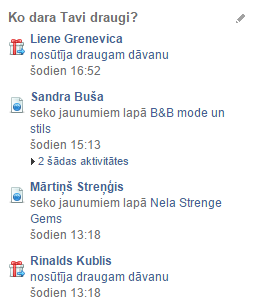
Activities must comply with these principles:
- Activity informs about actual user's action in the application.
- Activity system can't be used for advertising.
- Before starting to add new types of activities, it is highly recommended to consult with us before.
- For integrated applications activity URL has to contain address that will be displayed in the iframe, not the application address in draugiem.lv - it will automatically converted to internal address. Address opened in iframe can contain directory path and GET variables, but might not work if it contains file name with common extensions (php/css/jpg etc.) will not work
If application will create activities that do not follow the rules, we can deny application to post new activities.
**Request parameters:**
- `action`: `add_activity`
- `app`: application API key (32 characters)
- `apikey`: user API key (32 characters)
- `prefix`: optional, text that will be displayed before the clickable link. Max length 50 characters.
- `text`: text of clickable activity link. Max length 100 characters.
- `link`: optional, URL, where the activity link will point to. If not given, link will point to application start page. URL domain must be the same as given in the application settings. Max length 100 characters.
- If activity was successfuly created, response will contain element `status` with value `OK`.
- - **If application has no permission to post activities or if the user has blocked activities from this application,**: API will respond with error `150 (Access denied)`.
- If daily activity limit for user has been reached, API will respond with error `107 (Max activity limit for this user today reached)`
**Example response:**
```xml
OK
```
### 3.9. Posting notifications to user's profile news feed (request add_notification)
Request allows to add notification with a link to user's profile news feed (it will be visible only to the user)
**This feature is not enabled by default. To get permission for your application to post inotifications, contact api@draugiem.lv and tell us about your application and what kind of notifications it will create.** Integrated applications during the development phase are allowed to post notifications in test mode (they will be visible only to the developers). To continue posting notifications after publishing, they have to be enabled by draugiem.lv staff.
Notification link must point to the same domain that is configured as application URL in application settings.
Application's icon will be shown next to the created entry. Application can create up to 5 notifications per day for every user, no sooner than an hour after previous one.
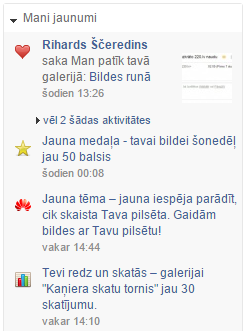
Notifications must comply with these principles:
- Notification informs about something that has happened with user's profile in the application. It is recommended that the notification link goes to a specific place in the application if it is possible.
- Notifications can't be used to advertise application with no reason.
- Before starting to add new types of notifications, it is highly recommended to consult with us before.
- For integrated applications notification URL has to contain address that will be displayed in the iframe, not the application address in draugiem.lv - it will automatically converted to internal address. Address opened in iframe can contain directory path and GET variables, but might not work if it contains file name with common extensions (php/css/jpg etc. will not work)
If application will create notifications that do not follow the rules, we can deny application to post new notifications.
It is possible to show both notifications that come from a specific user or notifications that are displayed as created by the application.
**Important:** Remember that notification is displayed to user that owns the API key that is used in request.So in order to send notification to user that currently is not online, application has to store user's API key for offline use.
**Request parameters:**
- `prefix`: optional, text that will be displayed before the clickable link. Max length 50 characters.
- `text`: text of clickable activity link. Max length 100 characters.
- `link`: optional, URL, where the activity link will point to. If not given, link will point to application start page. URL domain must be the same as given in the application settings. Max length 100 characters.
- `action`: `add_notification`
- `app`: application API key (32 characters)
- `apikey`: user API key (32 characters)
- `prefix`: optional, text that will be displayed before the clickable link. Max length 50 characters.
- `text`: text of clickable notification link. Max length 100 characters.
- `link`: optional, URL, where the notification link will point to. If not given, link will point to application start page. URL domain must be the same as given in the application settings. Max length 100 characters.
- `creator`: Optional, Draugiem.lv user ID that will be displayed as sender of the notification (user ID has to belong to a registrated user of the application; if this parameter is not given, application name will be displayed as the sender of the notification)
- If notification was successfuly created, response will contain element `status` with value `OK`.
- - **If application has no permission to post notifications or if the user has blocked notifications from this application,**: API will respond with error `150 (Access denied)`.
- If daily notification limit for user has been reached, API will respond with error `107 (Max activity limit for this user today reached)`
- If there is less then an hour since last added notification, request will return error `130 (Spam/Flood detected)`
**Example response:**
```xml
OK
```
### 3.10. Getting application status information (request app_status)
Request allows to get statistical information about application's status.
**Request parameters:**
- `action`: `app_status`
- `app`: application API key (32 characters)
Response will contain these information fields:
- `users`: Total number of users registered in application
- `users24h`: Number of users that have used application during last 24 hours (updated once every hour)
- `online`: Number of online users in the application during the last 5 minutes
- `api_rq`: Number of application's API requests per second (average value during the last 20 seconds)
- `activities`: Number of profile activities posted during the last minute
- `notifications`: Number of profile news notifications posted during the last minute
**Example response:**
```xml
159552
42872
1340
33.25
15
8
```
### 3.11. Adding an entry in calendar
Request allows you to add an entry (note) in calendar.
**Request parameters:**
- `action`: `calendar/add`
- `app`: application API key (32 characters)
- `apikey`: user API key (32 characters)
- `text`: text of your note
- `start_time`: start time (numerical value - *timestamp*)
- `end_time`: end time (numerical value - *timestamp*)
- `allday`: event is actual all day. Not mandatory. Allowed values - *1*, *0*
- `repeat`: repeating frequency of your note. Not mandatory. Allowed values - *daily*, *workdays*, *weekly*, *monthly*, *yearly*
**Example response after successfully added note:**
```xml
OK
```
## 4. Draugiem.lv API PHP library
To make application development faster and easier, we've created a PHP library that performs API calls and automatically converts the requested data to the PHP data structures. PHP library can be used both for integrated applications and draugiem.lv Passport applications.
[PHP library documentation](https://draugiem.eu/applications/dev/php_en/)
[Draugiem.lv PHP library and examples](https://github.com/Draugiem/draugiem-php-sdk)
https://i8.ifrype.com/profile/064/428/v3/sm_64428.jpg
https://i1.ifrype.com/profile/491/171/v3/i_64428.jpg
https://i1.ifrype.com/profile/491/171/v3/m_64428.jpg
https://i1.ifrype.com/profile/491/171/v3/l_64428.jpg
F
```
If request contains parameter `show` with value `ids`, response will contain element `userids`, that will hold a list of draugiem.lv user IDs. Element `users` will have an attribute `total` that contains total number of friends.
**Example response (show=ids is given):**
```xml
64428
491171
1524905
134564
234561
```
### 3.6. Getting number of user's friends that use the application (request app_friends_count)
Request allows to get the number of active user's friends that also use the application.
**Request parameters:**
- `action`: `app_friends_count`
- `app`: application API key (32 characters)
- `apikey`: user API key (32 characters)
Response contains element `friendcount`, that contains the number of user's friends that have authorized the application.
**Example response:**
```xml
16
```
### 3.7. Getting friendship status between two users (request check_friendship)
Request allows to check if two application users are friends.
**Request parameters:**
- `action`: `check_friendship`
- `app`: application API key (32 characters)
- `apikey`: user API key (32 characters), optional, if `uid2` parameter is provided
- `uid`: user ID of the first user
- `uid2`: user ID of the second user. Optional if `apikey` value is given.
- If both `uid` and `uid2` values are given, friendship status among these two users will be returned.
- If `uid2` balue is not given, but `apikey` value is provided, friendship status between API key owner and user `uid` will be returned.
- Response contains element `status`, that has value `OK` if there is a friendship between these two users.
- If there is no friendship, `status` value will be `NOT_FRIENDS`.
- If any of provided users is not registered application's user, `status` value will be `NOT_USERS`.
**Example response:**
```xml
OK
```
### 3.8. Posting entries to user's profile activity feed (request add_activity)
Request allows to add entry with a link to user's profile activity feed (entry will be visible to all of his friends)
**This feature is not enabled by default. To get permission for your application to post items to activity feed, contact api@draugiem.lv and tell us about your application and what kind of activities it will create.** Integrated applications during the development phase are allowed to post activities in test mode (they will be visible only to the developers). To continue posting activities after publishing, they have to be enabled by draugiem.lv staff.
Activity link must point to the same domain that is configured as application URL in application settings.
Application's icon will be shown next to the created entry. Only one activity per day can be created for each user.

Activities must comply with these principles:
- Activity informs about actual user's action in the application.
- Activity system can't be used for advertising.
- Before starting to add new types of activities, it is highly recommended to consult with us before.
- For integrated applications activity URL has to contain address that will be displayed in the iframe, not the application address in draugiem.lv - it will automatically converted to internal address. Address opened in iframe can contain directory path and GET variables, but might not work if it contains file name with common extensions (php/css/jpg etc.) will not work
If application will create activities that do not follow the rules, we can deny application to post new activities.
**Request parameters:**
- `action`: `add_activity`
- `app`: application API key (32 characters)
- `apikey`: user API key (32 characters)
- `prefix`: optional, text that will be displayed before the clickable link. Max length 50 characters.
- `text`: text of clickable activity link. Max length 100 characters.
- `link`: optional, URL, where the activity link will point to. If not given, link will point to application start page. URL domain must be the same as given in the application settings. Max length 100 characters.
- If activity was successfuly created, response will contain element `status` with value `OK`.
- - **If application has no permission to post activities or if the user has blocked activities from this application,**: API will respond with error `150 (Access denied)`.
- If daily activity limit for user has been reached, API will respond with error `107 (Max activity limit for this user today reached)`
**Example response:**
```xml
OK
```
### 3.9. Posting notifications to user's profile news feed (request add_notification)
Request allows to add notification with a link to user's profile news feed (it will be visible only to the user)
**This feature is not enabled by default. To get permission for your application to post inotifications, contact api@draugiem.lv and tell us about your application and what kind of notifications it will create.** Integrated applications during the development phase are allowed to post notifications in test mode (they will be visible only to the developers). To continue posting notifications after publishing, they have to be enabled by draugiem.lv staff.
Notification link must point to the same domain that is configured as application URL in application settings.
Application's icon will be shown next to the created entry. Application can create up to 5 notifications per day for every user, no sooner than an hour after previous one.

Notifications must comply with these principles:
- Notification informs about something that has happened with user's profile in the application. It is recommended that the notification link goes to a specific place in the application if it is possible.
- Notifications can't be used to advertise application with no reason.
- Before starting to add new types of notifications, it is highly recommended to consult with us before.
- For integrated applications notification URL has to contain address that will be displayed in the iframe, not the application address in draugiem.lv - it will automatically converted to internal address. Address opened in iframe can contain directory path and GET variables, but might not work if it contains file name with common extensions (php/css/jpg etc. will not work)
If application will create notifications that do not follow the rules, we can deny application to post new notifications.
It is possible to show both notifications that come from a specific user or notifications that are displayed as created by the application.
**Important:** Remember that notification is displayed to user that owns the API key that is used in request.So in order to send notification to user that currently is not online, application has to store user's API key for offline use.
**Request parameters:**
- `prefix`: optional, text that will be displayed before the clickable link. Max length 50 characters.
- `text`: text of clickable activity link. Max length 100 characters.
- `link`: optional, URL, where the activity link will point to. If not given, link will point to application start page. URL domain must be the same as given in the application settings. Max length 100 characters.
- `action`: `add_notification`
- `app`: application API key (32 characters)
- `apikey`: user API key (32 characters)
- `prefix`: optional, text that will be displayed before the clickable link. Max length 50 characters.
- `text`: text of clickable notification link. Max length 100 characters.
- `link`: optional, URL, where the notification link will point to. If not given, link will point to application start page. URL domain must be the same as given in the application settings. Max length 100 characters.
- `creator`: Optional, Draugiem.lv user ID that will be displayed as sender of the notification (user ID has to belong to a registrated user of the application; if this parameter is not given, application name will be displayed as the sender of the notification)
- If notification was successfuly created, response will contain element `status` with value `OK`.
- - **If application has no permission to post notifications or if the user has blocked notifications from this application,**: API will respond with error `150 (Access denied)`.
- If daily notification limit for user has been reached, API will respond with error `107 (Max activity limit for this user today reached)`
- If there is less then an hour since last added notification, request will return error `130 (Spam/Flood detected)`
**Example response:**
```xml
OK
```
### 3.10. Getting application status information (request app_status)
Request allows to get statistical information about application's status.
**Request parameters:**
- `action`: `app_status`
- `app`: application API key (32 characters)
Response will contain these information fields:
- `users`: Total number of users registered in application
- `users24h`: Number of users that have used application during last 24 hours (updated once every hour)
- `online`: Number of online users in the application during the last 5 minutes
- `api_rq`: Number of application's API requests per second (average value during the last 20 seconds)
- `activities`: Number of profile activities posted during the last minute
- `notifications`: Number of profile news notifications posted during the last minute
**Example response:**
```xml
159552
42872
1340
33.25
15
8
```
### 3.11. Adding an entry in calendar
Request allows you to add an entry (note) in calendar.
**Request parameters:**
- `action`: `calendar/add`
- `app`: application API key (32 characters)
- `apikey`: user API key (32 characters)
- `text`: text of your note
- `start_time`: start time (numerical value - *timestamp*)
- `end_time`: end time (numerical value - *timestamp*)
- `allday`: event is actual all day. Not mandatory. Allowed values - *1*, *0*
- `repeat`: repeating frequency of your note. Not mandatory. Allowed values - *daily*, *workdays*, *weekly*, *monthly*, *yearly*
**Example response after successfully added note:**
```xml
OK
```
## 4. Draugiem.lv API PHP library
To make application development faster and easier, we've created a PHP library that performs API calls and automatically converts the requested data to the PHP data structures. PHP library can be used both for integrated applications and draugiem.lv Passport applications.
[PHP library documentation](https://draugiem.eu/applications/dev/php_en/)
[Draugiem.lv PHP library and examples](https://github.com/Draugiem/draugiem-php-sdk)